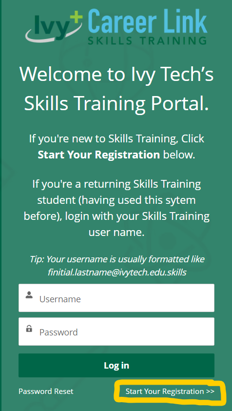
When you click on the  below, you will be directed to the Skills Training Self-Registration Portal. Once there, click on Start Your Registration. If you are a return skills training student and know your login information, you can also login. If that fails, click Start Your Registration (we'll be able to match your account).
Note: You will be asked to provide your SSN; this is necessary to match or create a new account with the College. This data is encrypted and deleted from the registration platform once it has been transmitted into our closed database. Please review the College's Skills Training Terms and Conditions and the Student Financial Agreement fully before submitting your registration. If you do not wish to submit your SSN, please reach out to the contact person for the class for alternatives.